Chapters
On this page
Introduction
A web crawler, also known as a spider or robot, is used to discover and collect web content, such as web pages, images, and videos. This chapter focuses on designing a scalable web crawler for search engine indexing.
Applications of Web Crawlers
- Search Engine Indexing: Collect web pages to create searchable indexes (e.g., Googlebot).
- Web Archiving: Preserve web data for future use (e.g., US Library of Congress).
- Web Mining: Extract knowledge from web data (e.g., financial analysis of shareholder reports).
- Web Monitoring: Detect copyright or trademark infringements.
Design Challenges
A good web crawler must address:
- Scalability: Handle billions of pages using parallelization.
- Robustness: Manage bad HTML, crashes, and malicious links.
- Politeness: Avoid overwhelming servers with too many requests.
- Extensibility: Support new content types with minimal changes.
Step 1: Understanding the Problem
Requirements
- Crawl 1 billion web pages per month (400 pages/second, peak 800 QPS).
- Collect HTML-only content.
- Track new and updated pages.
- Ignore duplicate content.
- Store crawled data for 5 years, requiring ~30 PB of storage.
Step 2: High-Level Design
Components
-
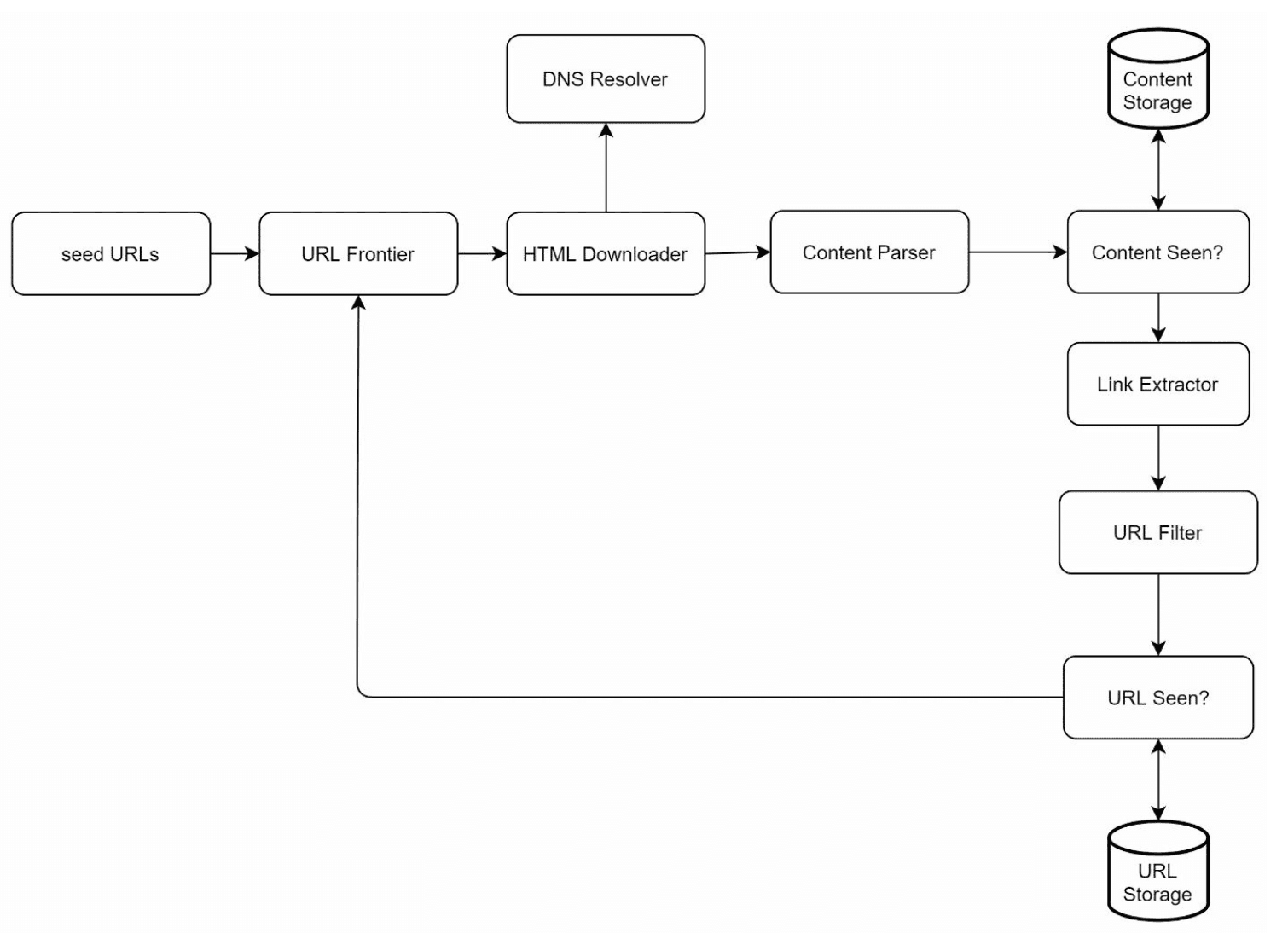
Seed URLs: Starting points for the crawler.
- Need to selective as a good starting point that a crawler can utilize to traverse as many links as possible.
- Can be based on locality based on different popular website or based on topics.
- Strategies: Categorize by locality or topic (e.g., sports, healthcare).
-
URL Frontier: Stores URLs to be downloaded.
- Implemented as a FIFO queue.
-
HTML Downloader: Downloads web pages from URLs provided by the URL Frontier.
-
DNS Resolver: Converts URLs to IP addresses.
-
Content Parser: Validates and parses web pages.
- Discards malformed pages.
-
Content Seen?: Checks for duplicate content using hash comparisons (compare the hash values of the two web pages).
-
Content Storage: Stores HTML pages on disk (popular content in memory to reduce latency).
-
URL Extractor: Extracts new links from parsed pages.
-
URL Filter: Excludes blacklisted or erroneous URLs.
-
URL Seen? Tracks visited URLs to avoid duplication.
-
URL Storage: Stores already visited URLs.
Workflow
- Add Seed URLs to the URL Frontier.
- HTML Downloader fetches URLs and resolves their IPs via the DNS Resolver.
- Content Parser validates and passes content to the "Content Seen?" component.
- If the content is new, extract links via the URL Extractor.
- Filter and add unique links to the URL Frontier.
Step 3: Deep Dive into Key Components
DFS/BFS
- The web can be though of as a directed graph where web pages are nodes and hyperlinks (URLs) as edges.
- BFS is usually used for graph traversal as the depth can be be very deep thus DFS is not ideal.
- Standard BFS does not take the priority of a URL into consideration, not every page has the same level of quality and importance.
URL Frontier
-
Politeness:
-
Ensure only one request per host at a time. Add a dealy b/w two download tasks.
-
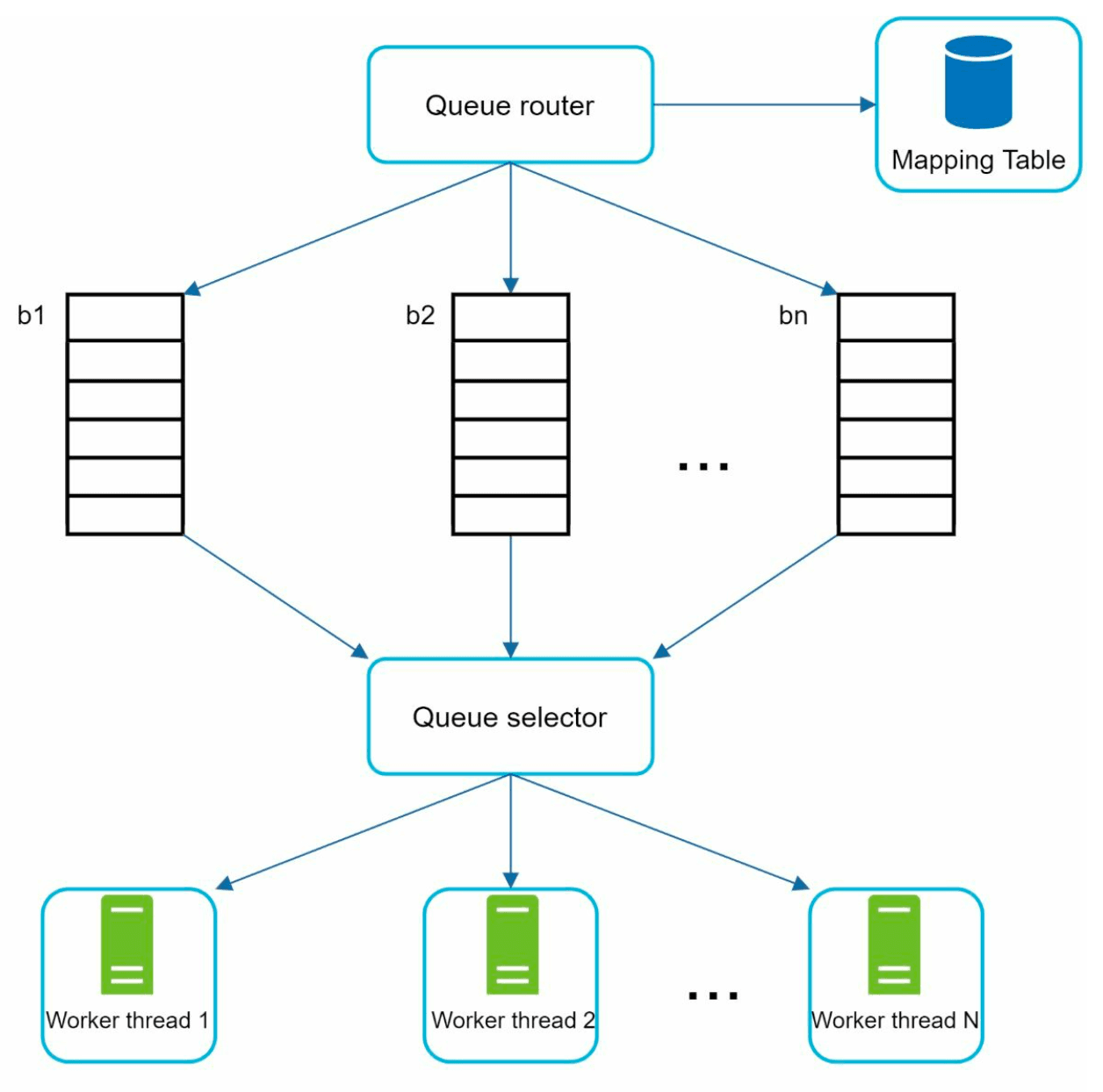
Use a mapping from hostnames to queues and worker (download) threads.
-
Each downloader thread has a separate FIFO queue and only downloads URLs from that queue.
-
Queue router: Ensures that each queue (b1, b2, … bn) only contains URLs from the same host.
-
Mapping table: It maps each host to a queue.
-
Queue selector: Each worker thread is mapped to a FIFO queue, and it only downloads URLs from that queue. The queue selection logic is done by the Queue selector.
-
Worker thread 1 to N. A worker thread downloads web pages sequentially from the same host. A delay can be added between two download tasks.
-
-
Priority:
-
Assign higher priority to important pages (e.g., by PageRank or update frequency).
-
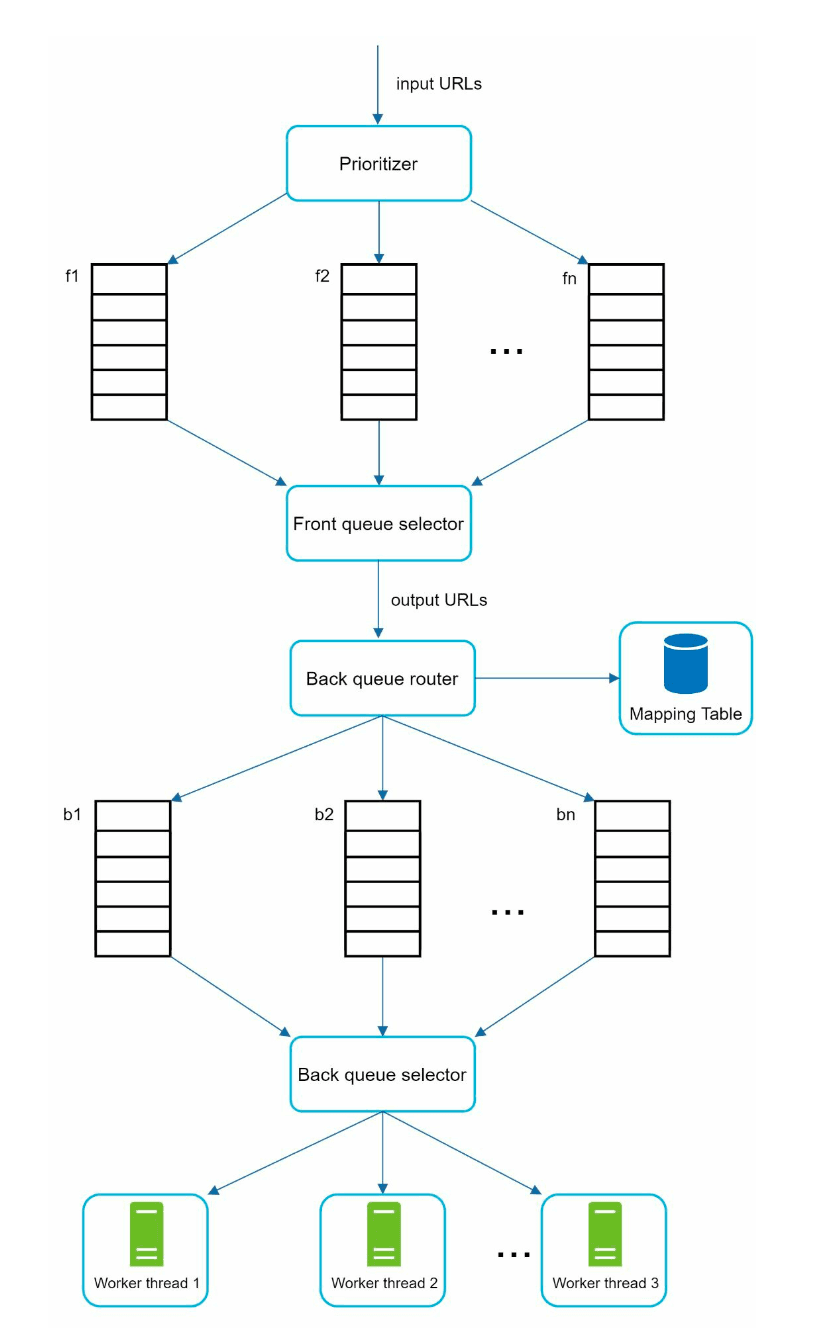
Prioritizer: It takes URLs as input and computes the priorities.
-
Queue f1 to fn: Each queue has an assigned priority. Queues with high priority are selected with higher probability.
-
Queue selector: Randomly choose a queue with a bias towards queues with higher priority.
-
Front queues: manage prioritization
-
Back queues: manage politeness
-
-
Freshness: Recrawl based on update history or importance.
HTML Downloader
- Robots.txt Compliance: Respect rules in robots.txt files.
- Performance Optimizations:
- Distributed crawling using multiple servers.
- Use a DNS cache to avoid repeated lookups.
- Geographically distribute crawl servers for faster downloads.
- Use a short timeout to avoid slow or unresponsive servers.
Robustness
- Consistent Hashing: Distribute load among servers effectively.
- Error Handling: Prevent system crashes from exceptions.
- Data Validation: Ensure content integrity.
Extensibility
-
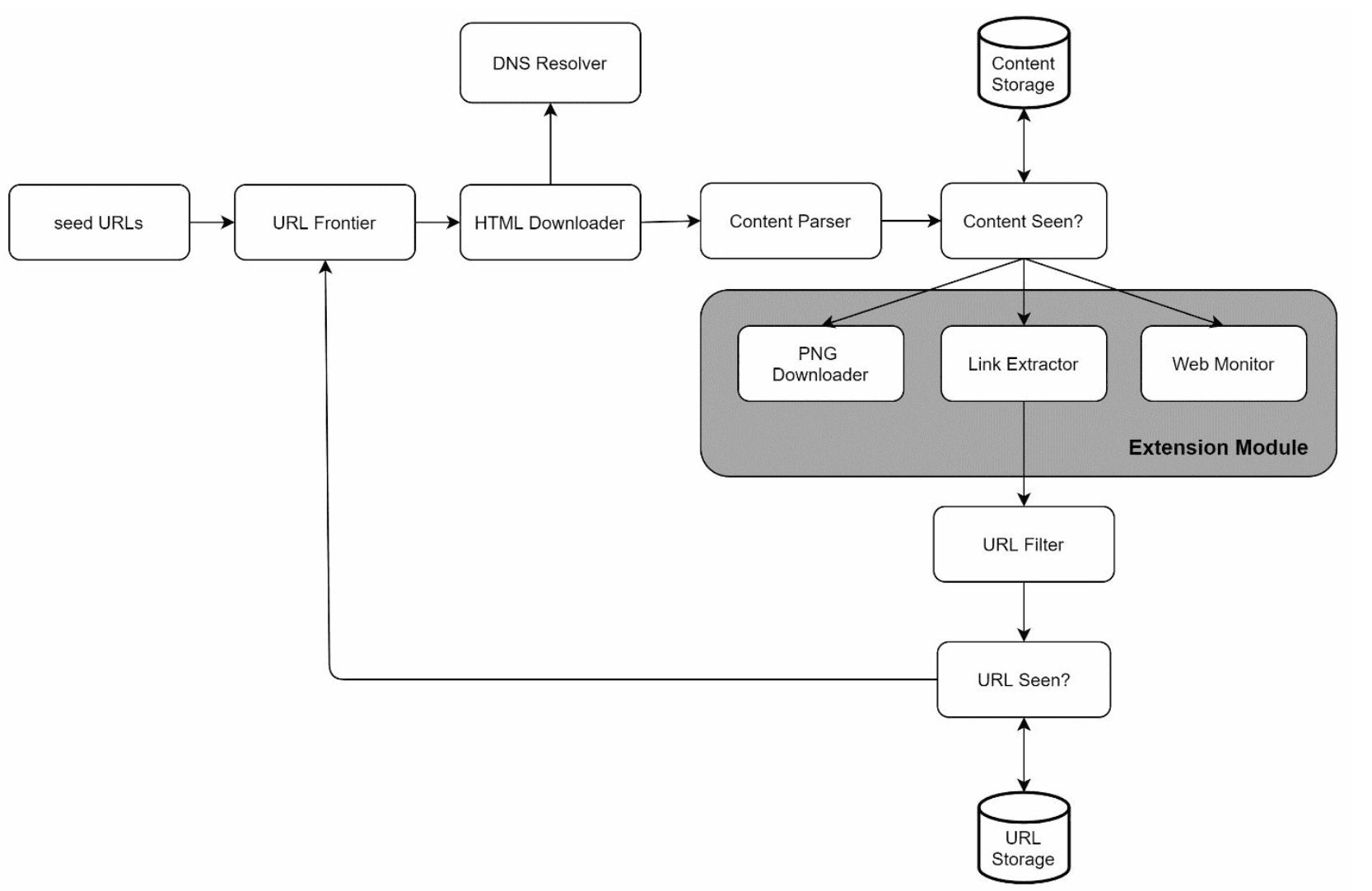
Add modules for new content types (e.g., PNG downloader, web monitor).
-
Example: Plug in a module to monitor web content for copyright violations.
Avoiding Problematic Content
- Duplicate Content: Detect using hash comparisons.
- Spider Traps: Avoid infinite loops with techniques like URL length limits.
- Data Noise: Filter irrelevant content like ads or spam.
Step 4: Wrap Up
Key Takeaways
- Web crawlers must balance scalability, robustness, politeness, and extensibility.
- Politeness prevents overloading servers, while priority ensures important pages are crawled first.
- Efficient storage and error handling are crucial for handling large-scale crawling.
Additional Considerations
- Server-Side Rendering: Handle dynamic content generated by JavaScript or AJAX.
- Anti-Spam Measures: Exclude low-quality or irrelevant pages.
- Database Sharding: Scale the data layer using replication and sharding.
- Horizontal Scaling: Use stateless servers to scale crawl jobs efficiently.
- Analytics: Collect and analyze data for insights.